
Signing transactions
Warnings explained
ERA LENS — the decoder that turns the request into readable rows — checks every transaction before you do. When something is worth a second look it says so in one of three places: a mark next to the row it applies to, a risk list shown before the review, or a full-screen stop where ERA refuses to sign at all. None of them means ERA is broken — each means this request differs from a plain, well-formed transaction for your wallet. When in doubt, cancel: a cancelled transaction costs nothing.
Steps
The marks on a row
Every mark belongs to one of four levels. The louder two also move that row up so you see it without switching modes.
| Mark | Level | What it means |
|---|---|---|
| Check in a ring | Recognised | ERA knows this address — it matches your whitelist. |
| i in a ring | Information | A detail about the row worth knowing. Nothing is wrong. |
| ! in a hollow triangle | Warning | Look closer before you approve. ERA still lets you continue. |
| ! in a filled circle | Danger | Something here can cost you the funds. ERA asks you to confirm before the review even opens. |
| Crossed-out eye | Danger, unreadable | ERA could not read part of the request, so it cannot show you what you would be signing. |
A row that carries a mark is drawn in a box — that is also how you know it can be tapped.
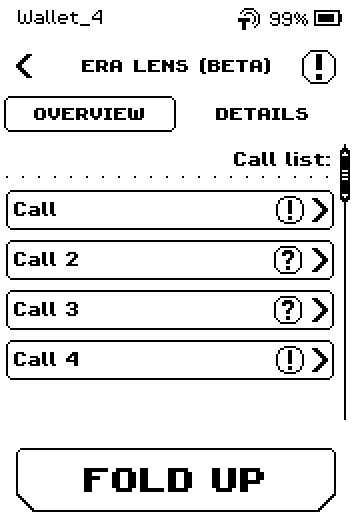
Read what a mark means
Tap the row. ERA opens a panel with the row's full value and one line per finding, the most serious first.
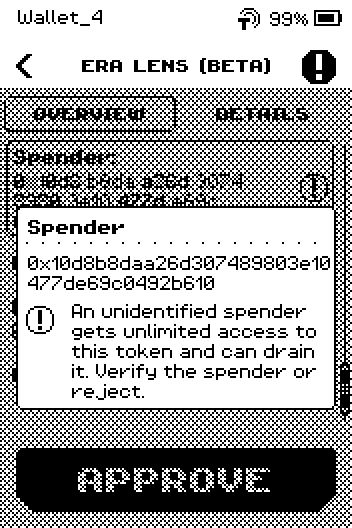
ERA: what the mark on that row means. Tap anywhere to close the panel.
The blinking badge: every finding in one place
You do not have to hunt for the marked rows. Whenever ERA LENS finds anything at Warning level or above, a badge appears in the top-right corner of the review and blinks for as long as the review is open.
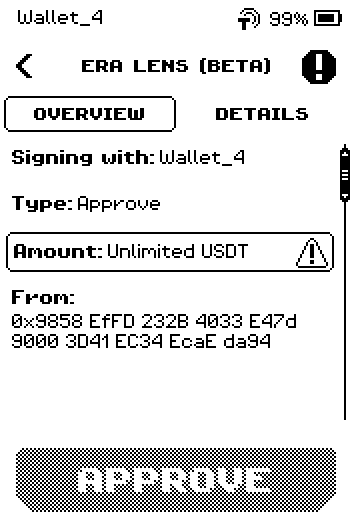
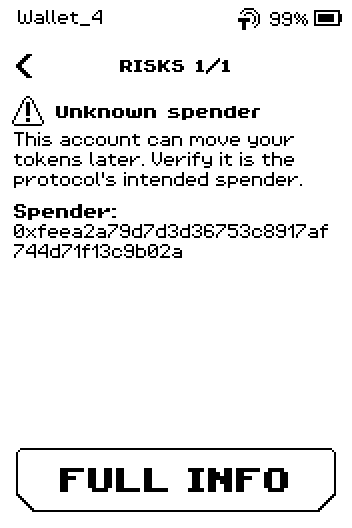
Tap the badge. ERA hides the transaction and shows the findings one per page: the mark, its name, the sentence explaining it, and the row it belongs to. The header counts them — RISKS 1/2 — and the bottom button reads FULL INFO.
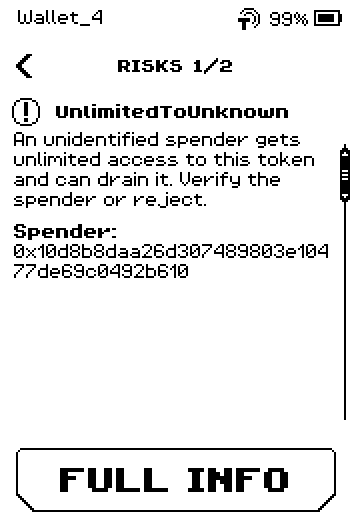
ERA: every finding, one per page. Swipe up to read the next finding.
Tap FULL INFO to go back to the transaction, where the same findings sit on their own rows.
Note: The two routes show the same findings from opposite ends. The badge answers "what did ERA LENS find in this transaction?"; tapping a row answers "why is this row marked?". Use the badge to be sure you have seen everything — a finding can belong to a part of the request that ERA does not print as a row of its own, and then the badge is the only way to reach it.
A request with warnings but no dangers never shows the risk list — the badge is the only summary you get, so it is worth a tap on every review that has one.
The risk list, before the review
If the request carries anything at Danger level, ERA shows a summary first and will not open the review until you pass it. The headline counts the findings; NEXT continues to the review, the back chevron declines the transaction.
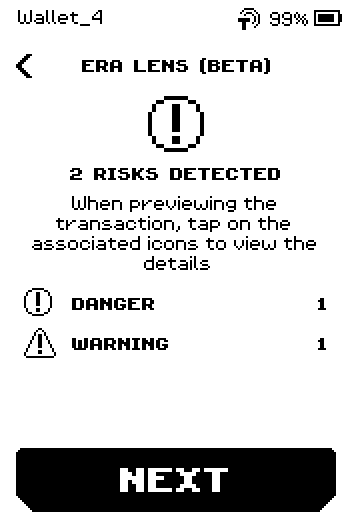
ERA: the risk list — here for an unlimited approval to an address ERA cannot identify. BLIND SIGNING has its own row, above the counted ones, and appears whenever any part of the request could not be read. It carries no number: either the request is readable or it is not.
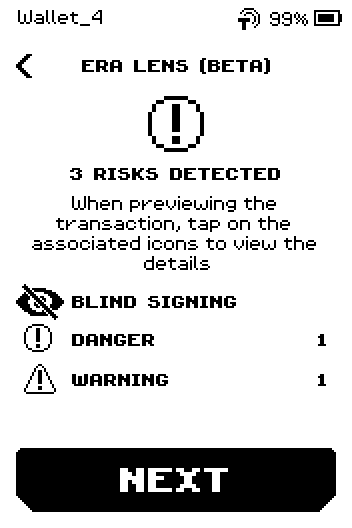
ERA: an unreadable request that also carries a danger and a warning. 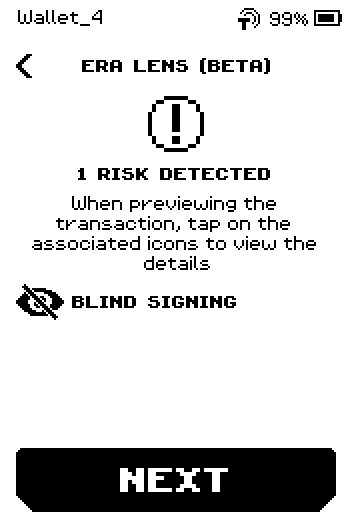
ERA: unreadable, and nothing else found. The rows below it count what was found, loudest first: DANGER, then WARNING. Information and Recognised marks are never listed here — you meet those on the rows themselves.
Caution: The risk list is not only about unreadable requests. An unlimited approval to an address ERA cannot identify, a contract taking control of your account, or a field that is not covered by your signature all bring you here with everything perfectly readable.
What the serious marks say
The device prints a full sentence for every finding, so you never have to remember these. These are the ones that decide whether to sign.
Danger — do not approve unless you can explain why it is there
| On screen | What it means |
|---|---|
| BlindSign | Part of this request is unreadable. You cannot verify everything you would sign. |
| UnlimitedToUnknown | An unidentified spender gets unlimited access to this token and can drain it. |
| Account delegation | A contract can act as your account until you revoke it. |
| Delegatecall | Code runs with your wallet's permissions and can change its controls. |
| Opaque hash | You would sign a hash whose meaning ERA cannot show. |
| Incomplete decode | ERA did not read all of the signed data. |
| Unsigned field | A field on screen is not covered by your signature — it has no effect, but it may be there to mislead you. |
| Malformed request | The request is broken; ERA cannot verify what you would be signing. Make a new one. |
Warning — check it, then decide
| On screen | What it means |
|---|---|
| Unlimited approval | The approval has no limit and stands until you revoke it. |
| Unknown spender | This account can move your tokens later; ERA cannot tell you who it is. |
| Entire collection access | An operator can move every asset in an NFT collection, including ones you buy later. |
| Amount unreadable | ERA cannot determine this amount. |
| Different account | The "from" account is not the account signing. |
| Recipient decides | After bridging, that account controls what happens next. |
| Extra debit | An extra amount of the network's own coin leaves your account and the transaction does not say why. |
Information marks explain a row — a fee recipient, a bridge minimum, an amount the contract computes at execution, a payout that is expected rather than guaranteed. Recognised ("Known address") means the address matched your whitelist.
The device refuses: CHANGE FRAUD
CHANGE FRAUD means the transaction marks an output as "your change" but the address is not in your wallet. ERA does not sign. Tap CLOSE.
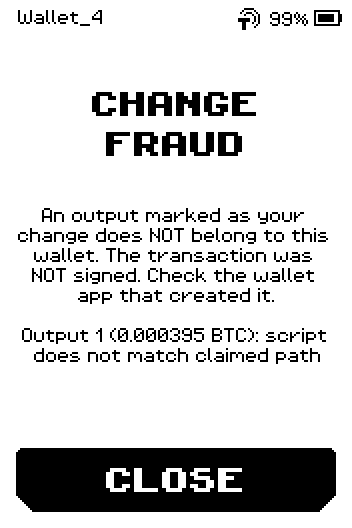
CHANGE FRAUD page: output 1 script does not match claimed path, CLOSE Rebuild the transaction in the software wallet. If the warning returns, the software wallet or the computer it runs on may be compromised — move to a clean device before sending anything.
The device refuses: INVALID REQUEST
INVALID REQUEST means the QR code is not a transaction ERA can handle: wrong wallet, unsupported chain, or not a transaction at all. Tap REPEAT to scan again or CANCEL to leave.
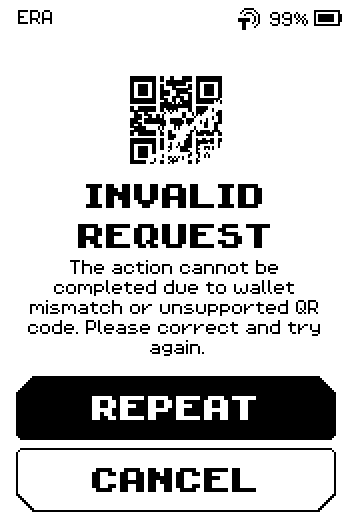
INVALID REQUEST page with REPEAT and CANCEL Check that the software wallet is linked to this ERA wallet, then scan again. Plain text or website QR codes are ignored by the scanner — nothing happens.
Unknown descriptor (multisig)
UNKNOWN DESCRIPTOR means the transaction spends from a multisig wallet whose setup (descriptor) is not saved on this ERA. Tap CANCEL unless you know why.
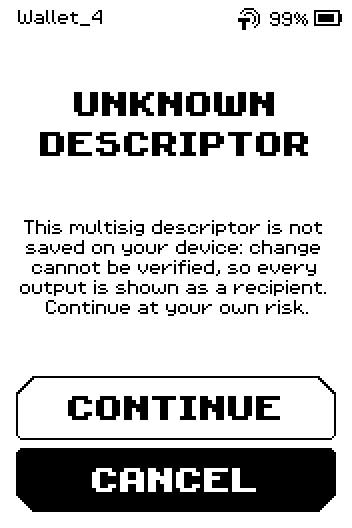
UNKNOWN DESCRIPTOR page with CONTINUE and CANCEL If you tap CONTINUE, the review shows Descriptor Not registered and lists every output as a recipient, because change cannot be verified.
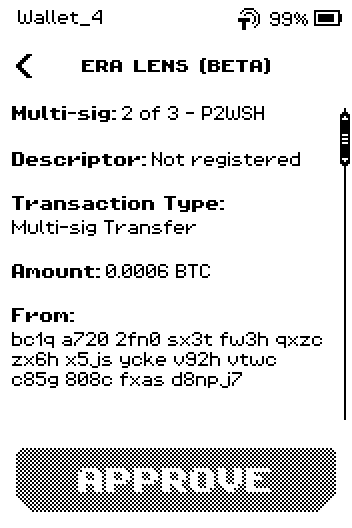
Multisig review: 2 of 3 P2WSH, Descriptor Not registered To avoid the warning, import the multisig setup first: wallet settings > Bitcoin Multisig (see Bitcoin multisig).
High fee
When the fee is 5 % or more of the amount sent, the review carries Warning: Fee is N% of the total value. ERA still lets you approve.
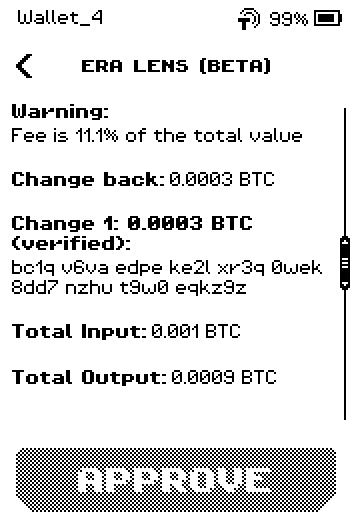
Review page with "Fee is 11.1% of the total value" warning Go back to the software wallet and lower the fee unless you chose it on purpose (small amounts often trigger this).
Find your wallet (Quick Sign)
With SCAN QR from the main menu, ERA looks for the wallet the request belongs to. If none matches you see FIND YOUR WALLET.
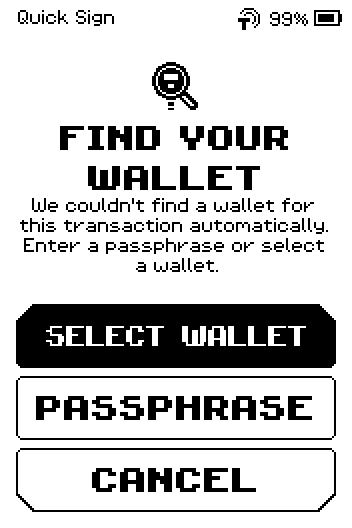
FIND YOUR WALLET page with SELECT WALLET, PASSPHRASE and CANCEL Tap SELECT WALLET to pick the wallet yourself, PASSPHRASE if the wallet needs its passphrase to match, or CANCEL.
Chains ERA cannot decode at all
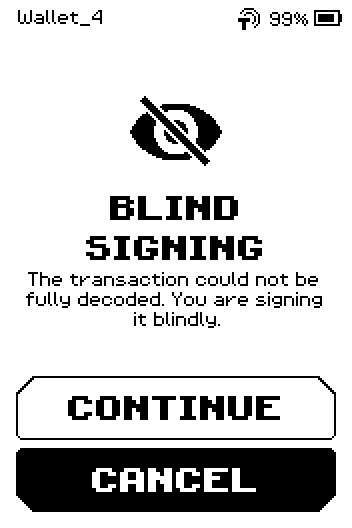
On a few chains (for example Sui and TON) ERA cannot read the transaction's contents, and a full-screen BLIND SIGNING page appears instead of a review. Tap CANCEL unless you built the transaction yourself; CONTINUE shows only the data size and the network. On Ethereum and the other EVM chains you will not see this page — an unreadable EVM request goes to the risk list instead, with the crossed-out eye.
The app warns you before ERA does (ERA Wallet app)
The ERA Wallet app simulates a transaction before it sends it to the device. When the result is dangerous — most often a request that would let a contract spend an unlimited amount of one of your tokens — the sheet turns red, hides the QR code, and asks you to tick I understand the risk before Sign anyway becomes available. Reject is the highlighted button.
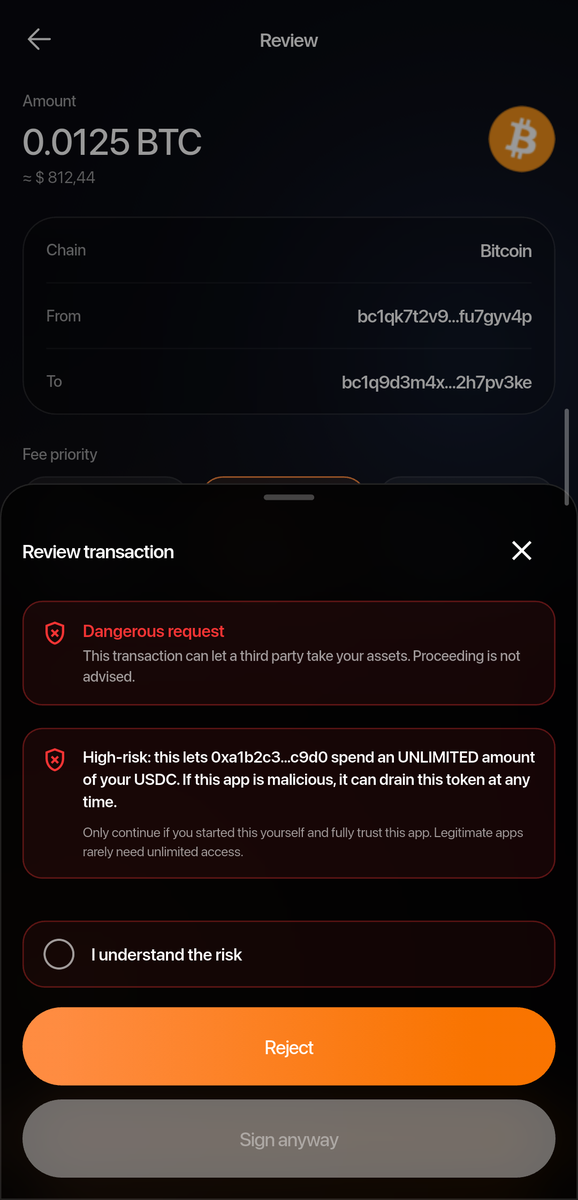
This is a second opinion, not the security boundary: ERA still shows you its own review pages, and nothing is signed until you approve on the device.
Done
You can tell the three kinds apart: the stops (CHANGE FRAUD, INVALID REQUEST) where ERA will not sign; the risk list that opens before a review carrying anything at Danger level; and the marks on rows, from a recognised address through to an unreadable one — reachable either by tapping the row or through the blinking badge in the review's top-right corner.
Trouble?
Every transaction from one software wallet carries a warning → re-link that wallet to ERA (see Link a software wallet); if it persists, try another software wallet.
A row is marked but the panel says a newer parser reported it → the request uses a finding this firmware does not know yet. Update the device, see Update the firmware over NFC.
The risk list counts more findings than you can find on the rows → tap the blinking badge in the review's top-right corner and read them there; a finding can belong to a part of the request ERA does not print as a row of its own.